Also please have a look at this sample too by mkropat https://gist.github.com/mkropat/8811708.js
Showing posts with label SharePoint 2013. Show all posts
Showing posts with label SharePoint 2013. Show all posts
Friday, September 18, 2015

Wednesday, September 16, 2015
JavaScript - Tips 3 - Namespace and SharePoint Web and List

Friday, February 20, 2015
PowerShell SharePoint Administration - Script samples
I always love and keep an eye on the SharePoint Administration. I have watched the MVA video training conducted by Christopher and his samples are in GitHub
If you are a developer, please have a look at it and understand and need to know some administration.
Download the SharePoint Administration scripts
If you are a developer, please have a look at it and understand and need to know some administration.
Download the SharePoint Administration scripts
Wednesday, October 1, 2014
SharePoint 2013 REST API calls using Fiddler
SharePoint 2013 REST API is the best choice to access server objects from client site. The easiest and more convenient way to test this is using Fiddler tool
The below are the two samples to demonstrate how to use Fiddler and pass header and body content to send request
Example 1: Add a list item (task) to a List (Tasks list)
Header
ACCEPT: application/json;odata=verbose
Content-Type: application/json;odata=verbose
X-RequestDigest: 0xE2872916105EF8654E29E7295F06D7A0CA96847415B5AC010F00FE871BADC181D85783853ECA1C9002C402B675F2CC00C9312293668F261888E7B3694F138567,01 Oct 2014 18:39:40 -0000
Host: yourhost.com
Content-Length: 91
Body
{'__metadata': {'type':'SP.Data.TasksListItem'},
'Title': 'Let me in via Fiddler REST'
};

Example 2: Add a list to a Web
Header
ACCEPT: application/json;odata=verbose
Content-Type: application/json;odata=verbose
X-RequestDigest: 0x16F60B1D8E5FD4DEC53E3609823866DA3DD8BC187A2C4F8070B4761183FC2C60B974ECA083B2E5613A1019C79277B18B4EDDEB41E3452F2D43CCD01ACDAF3957,01 Oct 2014 19:41:49 -0000
Host: rmitscvpspqa02:2000
Content-Length: 191
Body
{ '__metadata': { 'type': 'SP.List' }, 'AllowContentTypes': true, 'BaseTemplate': 100,
'ContentTypesEnabled': true, 'Description': 'My list description', 'Title': 'Test List from fiddler' }

The below are the two samples to demonstrate how to use Fiddler and pass header and body content to send request
Example 1: Add a list item (task) to a List (Tasks list)
Header
ACCEPT: application/json;odata=verbose
Content-Type: application/json;odata=verbose
X-RequestDigest: 0xE2872916105EF8654E29E7295F06D7A0CA96847415B5AC010F00FE871BADC181D85783853ECA1C9002C402B675F2CC00C9312293668F261888E7B3694F138567,01 Oct 2014 18:39:40 -0000
Host: yourhost.com
Content-Length: 91
Body
{'__metadata': {'type':'SP.Data.TasksListItem'},
'Title': 'Let me in via Fiddler REST'
};
Example 2: Add a list to a Web
Header
ACCEPT: application/json;odata=verbose
Content-Type: application/json;odata=verbose
X-RequestDigest: 0x16F60B1D8E5FD4DEC53E3609823866DA3DD8BC187A2C4F8070B4761183FC2C60B974ECA083B2E5613A1019C79277B18B4EDDEB41E3452F2D43CCD01ACDAF3957,01 Oct 2014 19:41:49 -0000
Host: rmitscvpspqa02:2000
Content-Length: 191
Body
{ '__metadata': { 'type': 'SP.List' }, 'AllowContentTypes': true, 'BaseTemplate': 100,
'ContentTypesEnabled': true, 'Description': 'My list description', 'Title': 'Test List from fiddler' }
To test it, go to SharePoint site and verify. Its cool :)
Note : Where do I get the form digest value to include in my request?
As described on this page on MSDN, you can retrieve this value by making a POST request with an empty body to http://site/_api/contextinfo and extracting the value of the “d:FormDigestValue” node in the XML that the contextinfo endpoint returns.
Thursday, September 25, 2014
Solution deployment stuck on deploying
I got the deployment issue in visual studio and powershell scripts in farm solutions. Most of the solutions in the google are suggesting to do the following steps and I did and restarted the all the servers. But the issue continues. Fortunately I got the real reason after reviewing the sharepoint log file. So the lesson learned is "The reason may be anything and review your log file carefully"
The actions which I tried (not got the solution)
1. Make sure SharePoint timer service should be started on all the servers (web front ends as well as app server)
2. Try restarting the SharePoint Administration service on all the servers.
3. Restart all the SharePoint servers
4. Make sure that all the servers in farm are on the same time zone.
5. Execute stsadm -o execadmsvcjobs on all the servers of the farm
6. Cancel the deployment job by means of central administration, remove the solution and try to add the solution again & check the results.
7. Check the status of the jobs by means of CA-timer job status or use te following command - stsadm -o enumdeployments - This will give you the list of all the pending & active deployments.
Still had the error while cancel the deployment job using CA. The error thrown by CS is "Object reference not set to an instance of an object". This confuses me more and I started reviewing the sharepoint log file using ULS Viewer, and I got the real reason for this strange behaviour.
SharePoint Log Critical Error
Database full error on SQL Server instance 'XXX' in database 'SharePoint_Config'. Additional error information from SQL Server is included below. Could not allocate space for object 'dbo.Tombstones'.'PK_Tombstones' in database 'SharePoint_Config' because the 'PRIMARY' filegroup is full. Create disk space by deleting unneeded files, dropping objects in the filegroup, adding additional files to the filegroup, or setting autogrowth on for existing files in the filegroup.

Solution
Increased the DB size and the issue is resolved
USE master;
GO
ALTER DATABASE SharePoint_Config
MODIFY FILE
(NAME = test1dat3,
SIZE = 10240MB);
GO
or Use "SQL Management Studio" as shown below.

The actions which I tried (not got the solution)
1. Make sure SharePoint timer service should be started on all the servers (web front ends as well as app server)
2. Try restarting the SharePoint Administration service on all the servers.
3. Restart all the SharePoint servers
4. Make sure that all the servers in farm are on the same time zone.
5. Execute stsadm -o execadmsvcjobs on all the servers of the farm
6. Cancel the deployment job by means of central administration, remove the solution and try to add the solution again & check the results.
7. Check the status of the jobs by means of CA-timer job status or use te following command - stsadm -o enumdeployments - This will give you the list of all the pending & active deployments.
Still had the error while cancel the deployment job using CA. The error thrown by CS is "Object reference not set to an instance of an object". This confuses me more and I started reviewing the sharepoint log file using ULS Viewer, and I got the real reason for this strange behaviour.
SharePoint Log Critical Error
Database full error on SQL Server instance 'XXX' in database 'SharePoint_Config'. Additional error information from SQL Server is included below. Could not allocate space for object 'dbo.Tombstones'.'PK_Tombstones' in database 'SharePoint_Config' because the 'PRIMARY' filegroup is full. Create disk space by deleting unneeded files, dropping objects in the filegroup, adding additional files to the filegroup, or setting autogrowth on for existing files in the filegroup.
Solution
Increased the DB size and the issue is resolved
USE master;
GO
ALTER DATABASE SharePoint_Config
MODIFY FILE
(NAME = test1dat3,
SIZE = 10240MB);
GO
or Use "SQL Management Studio" as shown below.
Thursday, September 18, 2014
SharePoint 2013 Modal Dialog with parent page refresh

<script type="text/javascript">

function ShowModal() {

    ExecuteOrDelayUntilScriptLoaded(function () {

        var options = {

            url: 'http://sharepointsite.com/sites/devsite/Lists/Project%20Tasks/DispForm.aspx?ID=2&Source=http%3A%2F%2Frmitscvpspqa02%3A1000%2Fsites%2Fdevsite%2FLists%2FProject%2520Tasks%2FAllItems%2Easpx&ContentTypeId=0x010800EFF7689E39CAEB4C9BF59AEB73ABEFA9',

            tite: 'Add Vendor',

            width: 800,

            height: 475,

            allowMaximize: true,

            showClose: true,

            dialogReturnValueCallback: scallback

        };

        SP.UI.ModalDialog.showModalDialog(options);

    }, 'sp.js');

 }


 function scallback(dialogResult, returnValue) {

      alert(dialogResult);

      SP.UI.ModalDialog.RefreshPage(SP.UI.DialogResult.OK);


      if (dialogResult == SP.UI.DialogResult.OK) {

           alert('Ok');

           SP.UI.ModalDialog.RefreshPage(SP.UI.DialogResult.OK);

           }

      }


      </script>

<input onclick="javascript:ShowModal();" type="button" value="Model Popup"/>
Friday, September 5, 2014
Office 365 Development Setup & SharePoint PnP
Step 1 : SharePoint Online: Sign up for a free Office 365 Developer Site from your MSDN subscription
Step 3 : The home page will be shown like the below image

4
Step 4 : Click the SharePoint and the SharePoint Administrator page will appear as shown below. Note that the admin website link is required for some visual studio app development.
Step 5 : Create a Developer Site collection and it is highlighted as shown below

Step 6 : Now go to https://github.com/OfficeDev/PnP
and download the sample ZIP file. It contains core components and samples and
need VS 2013 (I tried using VS2013)

Step 7 : Open a sample project from the downloaded zip
file


Step 9 : That is it. :) ... Make sure you understand the code in the samples which will make your work easy and reduce your code dramatically. The good thing is its all CSOM and hosted in S2S (Provider hosted app model).
Reference :
Wednesday, September 3, 2014
SharePoint 2013 Designer Workflow - Expense claims approval process part 2 of 3
List of Article in Series
1.
Overview of Business requirement (part 1/3)
2. Build Workflow using SharePoint
Designer (part 2/3)
3. Deployment and Testing (part 3/3)
Build Workflow using SharePoint
Designer
In my previous article I have explained
the expense claims workflow logic and provided a Visio diagram. Make sure to
read the first article before proceeding further.
Used SharePoint Designer to develop the
workflow and no code. I used some basic activities which are available in
SharePoint 2013 and built a complex ( J ) approval process.
The below are the Text-based and visual
workflow designer code.
Text-based

Visual Designer

SharePoint 2013 .Wsp vs .App Scenario
Always try to use Apps whenever it is possible. Because
1. Sandbox solution is supported but it is deprecated.
2. Farm solution requires downtime, cost and monitoring
3. Choose the solution and Apps model based on the scenario and the below screen shot will explain the scenario and the recommended model

Wednesday, July 23, 2014
OneDrive for Business - Setup and Implementation for SharePoint 2013
Step - 1
Download the OneDrive for business from Microsoft site http://support.microsoft.com/kb/2903984
Based on your requirement you can download any client as shown in the below figure.

Step - 2
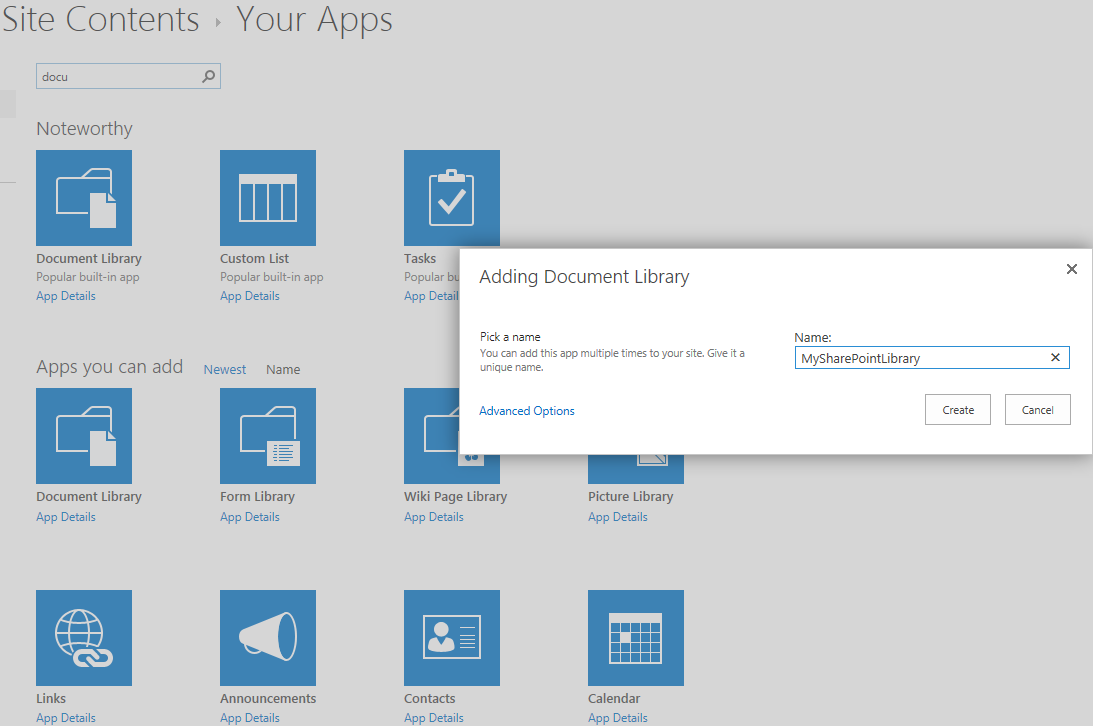
Before installation, let us create a custom document library for our demonstration and testing purpose. We will use this document library to upload and sync the documents. Name is as "MySharePointLibrary" as shown in below figure.
Step - 3
Now upload a document by just drag and drop from your windows explorer.

Step - 4
Install the OneDrive now, which you have downloaded in step 1
During the installation, the wizard have to provide the document library which you want to download to local machine and sync.

Optionally you can also change the path of the local directory.

Installation and Sync in progress


That is it.
Step - 5
Testing. Go to your local directory which you have configured during the installation and you can see the document which is actually downloaded to local machine during the sync process.
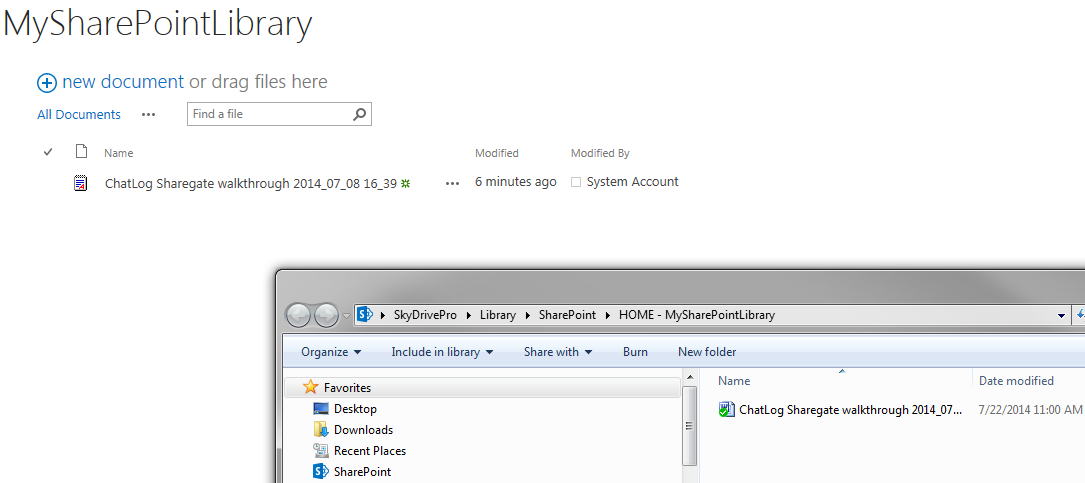
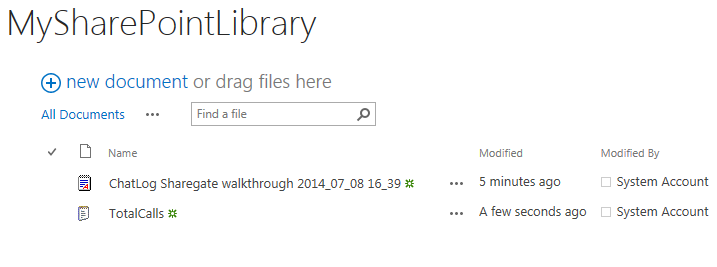
Now add a new document (txt file) to the local directory

Now right click on the OneDrive (in the tray) and press "Sync now" context menu.

Now the new file will appear in the SharePoint document library as shown below
Now I am going to delete as shown below from SharePoint

NB, this time I am going to use the Sync from SharePoint as shown in the below figure (see the top right corner)

Step - 6
Additional Information : OneDrive is free and have some limitations and see the below Information for Plans and features


Friday, July 11, 2014
SharePoint 2013 Designer Workflow - Expense claims approval process part 1 of 3
List of Article in Series
1. Overview of Business requirement
3. Deployment and Testing
Overview of Business requirement
Employees upload their Expense Claims document in the document library with metadata such as Expense amount, Title etc. The below is the flow chart of the business process and read the rules logic in the process carefully.

We can develop the workflow solution either in Visual studio project or SharePoint Designer (SPD) tool. Since the logic is not complex and SPD 2013 is so matured and comes with many handy actions, we are going to develop in SharePoint 2013.
Please wait for the part 2 of 3 article, I will publish is shortly.
Wednesday, July 9, 2014
SharePoint 2013 BI & SSRS Useful links
SharePoint 2013 BI - Business Intelligence - EPC Group.net
http://www.youtube.com/watch?v=9ZaImjFdYwI
BI Tools: Reporting Services (SSRS) in SharePoint (Tutorial)
http://www.youtube.com/watch?v=mMEIx3S4gqs
Good SSRS Report development with Grouping (parent and child level group), Parameter , Currency format, Header text formats and Deployment (using visual studio)
http://www.youtube.com/watch?v=hjcf8F-b3Iw
http://www.youtube.com/watch?v=9ZaImjFdYwI
BI Tools: Reporting Services (SSRS) in SharePoint (Tutorial)
http://www.youtube.com/watch?v=mMEIx3S4gqs
Good SSRS Report development with Grouping (parent and child level group), Parameter , Currency format, Header text formats and Deployment (using visual studio)
http://www.youtube.com/watch?v=hjcf8F-b3Iw
Drillthrough and drilldown
Document Maps Lable (Bookmark)
Tuesday, July 8, 2014
The search request was unable to connect to the Search Service.
Getting user preference failed: Microsoft.Office.Server.Search.Query.SearchServiceNotFoundException: The search request was unable to connect to the Search Service.
Cause : The search service application proxy is responsible for the communication between the search webpart and the search service application. Also the proxy application may be corrupted.
Resolution : If you already have a search service application proxy, then delete it. Now run the below command to create a new proxy
$searchServApp = Get-SPEnterpriseSearchServiceApplication
New-SPEnterpriseSearchServiceApplicationProxy -SearchApplication $searchServApp
Thursday, June 26, 2014
Friday, June 20, 2014
SharePoint Workflow - Video and Text
Workflow actions in SharePoint Designer 2010: A quick reference guide
Create a Site Workflow and modify its form using InfoPath
Creating a Workflow on a List using SharePoint Designer 2010
Customize “Start Custom Task Process” in SharePoint Designer 2010
SPD Workflow Packaging and Deployment
http://blogs.msdn.com/b/sharepointdesigner/archive/2012/08/30/packaging-list-site-and-reusable-workflow-and-how-to-deploy-the-package.aspx
Advanced Workflow 2013
http://blogs.msdn.com/b/chhopkin/archive/2011/11/17/create-your-own-visualizations-for-sharepoint-workflows-built-with-visual-studio-and-visio.aspx
http://plexhosted.com/billing/knowledgebase/300/How-to-enable-workflow-visualization-at-the-SharePoint-site-SharePoint-2010.html
SharePoint 2013 Visual Studio workflows for escalations (StateMachine type with code)
http://www.youtube.com/watch?v=cl_vo6JFBlE
SharePoint 2013 VS Workflow Declarative type (NO code) Sandbox deployment
http://www.codeproject.com/Tips/620173/Step-by-Step-Approach-to-Create-a-Visual-Studio-Sh
http://blogs.msdn.com/b/officeapps/archive/2013/03/27/sharepoint-workflow-development-with-office-developer-tools-for-visual-studio-2012.aspx
SPD 2013
SharePoint 2013 Workflow ( using Workflow Manager )
http://msdn.microsoft.com/en-us/library/office/dn518136(v=office.15).aspx
Topics on Sharepoint 2013 workflow
1: SharePoint 2013 and Workflow Manager 1.0 In-Depth
This module explains in detail the architecture that makes up the SharePoint 2013 workflow story including SharePoint 2013, Workflow Manager 1.0 and Service Bus 1.0.
2: SharePoint 2013 and Workflow Manager 1.0 Debugging
This module covers the different options developers have in their toolbox to debug workflows they are building for SharePoint 2013 and Workflow Manager 1.0.
3: The New Workflow Services Manager Client API
This module covers the different client APIs, both for managed and unmanaged code, that have been added to control the workflow surface in SharePoint 2013 and Workflow Manager 1.0.
4: Creating Custom Forms for SharePoint 2013 Workflows
This module covers the background story for creating custom forms in SharePoint and guidance on how to create custom forms for SharePoint 2013 workflows.
5: Creating Custom Reusable Activities and Actions for Workflows
This module covers creating custom activities for use in other SharePoint 2013 Visual Studio authored workflows as well as action files for using the activities within SharePoint Designer 2013 authored workflows.
Videos at http://www.pluralsight.com/training/Courses/TableOfContents/sharepoint2013-workflow-advanced-topics
Install and configure Workflow in SharePoint Server 2013
http://technet.microsoft.com/en-us/library/dn201724(v=office.15)
Step 1
Create a Site Workflow and modify its form using InfoPath
Creating a Workflow on a List using SharePoint Designer 2010
Customize “Start Custom Task Process” in SharePoint Designer 2010
SPD Workflow Packaging and Deployment
http://blogs.msdn.com/b/sharepointdesigner/archive/2012/08/30/packaging-list-site-and-reusable-workflow-and-how-to-deploy-the-package.aspx
Advanced Workflow 2013
http://blogs.msdn.com/b/chhopkin/archive/2011/11/17/create-your-own-visualizations-for-sharepoint-workflows-built-with-visual-studio-and-visio.aspx
http://plexhosted.com/billing/knowledgebase/300/How-to-enable-workflow-visualization-at-the-SharePoint-site-SharePoint-2010.html
SharePoint 2013 Visual Studio workflows for escalations (StateMachine type with code)
http://www.youtube.com/watch?v=cl_vo6JFBlE
SharePoint 2013 VS Workflow Declarative type (NO code) Sandbox deployment
http://www.codeproject.com/Tips/620173/Step-by-Step-Approach-to-Create-a-Visual-Studio-Sh
http://blogs.msdn.com/b/officeapps/archive/2013/03/27/sharepoint-workflow-development-with-office-developer-tools-for-visual-studio-2012.aspx
SPD 2013
SharePoint 2013 Workflow ( using Workflow Manager )
http://msdn.microsoft.com/en-us/library/office/dn518136(v=office.15).aspx
Topics on Sharepoint 2013 workflow
1: SharePoint 2013 and Workflow Manager 1.0 In-Depth
This module explains in detail the architecture that makes up the SharePoint 2013 workflow story including SharePoint 2013, Workflow Manager 1.0 and Service Bus 1.0.
2: SharePoint 2013 and Workflow Manager 1.0 Debugging
This module covers the different options developers have in their toolbox to debug workflows they are building for SharePoint 2013 and Workflow Manager 1.0.
3: The New Workflow Services Manager Client API
This module covers the different client APIs, both for managed and unmanaged code, that have been added to control the workflow surface in SharePoint 2013 and Workflow Manager 1.0.
4: Creating Custom Forms for SharePoint 2013 Workflows
This module covers the background story for creating custom forms in SharePoint and guidance on how to create custom forms for SharePoint 2013 workflows.
5: Creating Custom Reusable Activities and Actions for Workflows
This module covers creating custom activities for use in other SharePoint 2013 Visual Studio authored workflows as well as action files for using the activities within SharePoint Designer 2013 authored workflows.
Videos at http://www.pluralsight.com/training/Courses/TableOfContents/sharepoint2013-workflow-advanced-topics
Thursday, June 19, 2014
Wednesday, June 18, 2014
SharePoint Registration ID, List Template ID
The list template ID is required for a hardcore SharePoint developer and frequently I used to refer this. Hope some one will see this page and useful for them.
100 Generic list
101 Document library
102 Survey
103 Links list
104 Announcements list
105 Contacts list
106 Events list
107 Tasks list
108 Discussion board
109 Picture library
110 Data sources
111 Site template gallery
112 User Information list
113 Web Part gallery
114 List template gallery
115 XML Form library
116 Master pages gallery
117 No-Code Workflows
118 Custom Workflow Process
119 Wiki Page library
120 Custom grid for a list
130 Data Connection library
140 Workflow History
150 Gantt Tasks list
200 Meeting Series list
201 Meeting Agenda list
202 Meeting Attendees list
204 Meeting Decisions list
207 Meeting Objectives list
210 Meeting text box
211 Meeting Things To Bring list
212 Meeting Workspace Pages list
301 Blog Posts list
302 Blog Comments list
303 Blog Categories list
1100 Issue tracking
1200 Administrator tasks list
100 Generic list
101 Document library
102 Survey
103 Links list
104 Announcements list
105 Contacts list
106 Events list
107 Tasks list
108 Discussion board
109 Picture library
110 Data sources
111 Site template gallery
112 User Information list
113 Web Part gallery
114 List template gallery
115 XML Form library
116 Master pages gallery
117 No-Code Workflows
118 Custom Workflow Process
119 Wiki Page library
120 Custom grid for a list
130 Data Connection library
140 Workflow History
150 Gantt Tasks list
200 Meeting Series list
201 Meeting Agenda list
202 Meeting Attendees list
204 Meeting Decisions list
207 Meeting Objectives list
210 Meeting text box
211 Meeting Things To Bring list
212 Meeting Workspace Pages list
301 Blog Posts list
302 Blog Comments list
303 Blog Categories list
1100 Issue tracking
1200 Administrator tasks list
Tuesday, June 17, 2014
SQL Server 2012 SP1 SSRS Integration with SharePoint 2013
The below are the Important points
1. Install SQL Server 2012 featured installation with SharePoint Integrated mode (Install only)
If App server and WFE server is in a single box, then follow the steps 2 and 3
2. Install SQL Server 2012 SP1 featured installation option in "App server"
3. Choose the shared features "Reporting Services - SharePoint" and "Reporting Services Add-in for SharePoint products"


If App server and WFE server are in different box 4 to 6
4. Install SQL Server 2013 SP1 featured installation option in "App server"
5. Choose the shared features "Reporting Services - SharePoint" in "App server"
6. Choose the shared features "Reporting Services Add-in for SharePoint Products" in WFE server.


7. In app server (where we installed SSRS) you have to run the below power shell scripts
Install-SPRSService
Install-SPRSServiceProxy
get-spserviceinstance -all |where {$_.TypeName -like “SQL Server Reporting*”} | Start-SPServiceInstance


Note : SSRS in integrated mode (now as a service application) needs to be installed on the SharePoint server, not the SQL
Server.Also, with 2012, you should be installing the SP1 update in order to integrate with SharePoint 2013.
Sunday, June 15, 2014
Subscribe to:
Posts (Atom)